Timeline cue editing
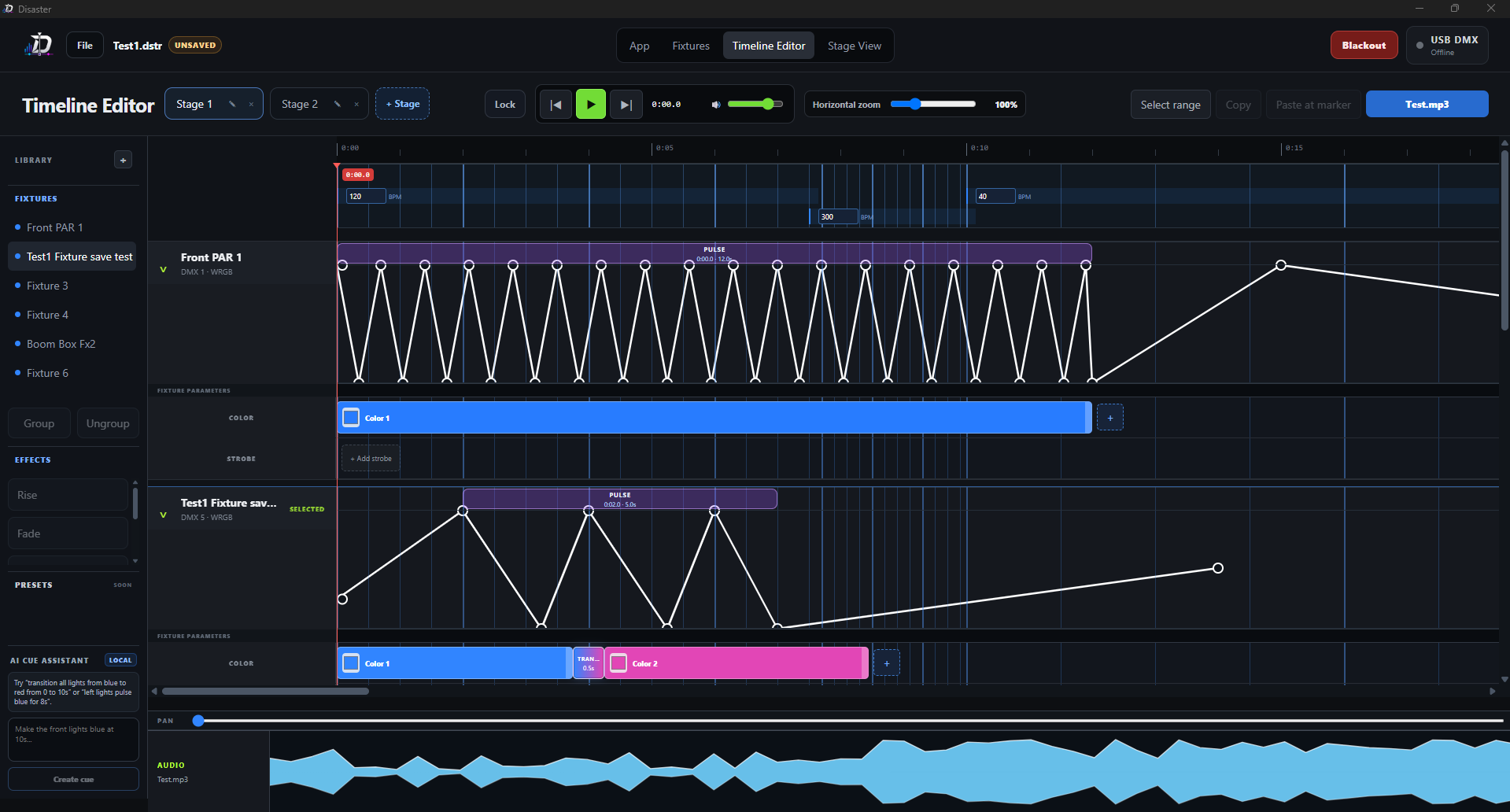
Edit intensity, color, strobe, color transitions, and cue timing directly on the timeline. Custom beatgrids let different parts of the same audio file snap to different BPM values.
DMX timeline programming and playback
Disaster is a cross-platform desktop app for building timed DMX cues, editing intensity and color, previewing fixtures on a 2D stage plot, and sending live output through USB DMX or Art-Net.
Features
Edit intensity, color, strobe, color transitions, and cue timing directly on the timeline. Custom beatgrids let different parts of the same audio file snap to different BPM values.
Pick colors quickly, drag transitions between looks, and copy cues across fixtures without rebuilding the same timing by hand.
Create pulses, fades, rises, and custom intensity shapes with editable curves and presets instead of manually placing every control point.
Place fixtures on a stage plot, set their orientation, and preview how lights interact with each other before running the cue live.
Write plain-English instructions such as “pulse the right-side lights blue from 10s to 18s” or “fade the back lights to red on the chorus.” The assistant uses fixture location, timing, color, and effect language to create cues that match the stage layout.
Create fixture types with your own channel order for WRGB, RGBW, dimmer-first layouts, strobes, and custom DMX mappings.
Preview raw output across all 512 channels, see exactly what is being sent, and use active fixture sliders to adjust individual patched channels.
Supports one universe over USB DMX using OpenDMX-style transmitters and Art-Net output. Plug in the transmitter and start testing with auto-connect behavior.
Group fixtures to share cues across lights, then still add custom individual cues where a specific fixture needs its own timing or look.
Blackout turns off all lights immediately. Lock mode protects live playback by requiring a deliberate mouse double-press so the show is not paused accidentally with the spacebar.
Add multiple stages to test different cue setups. Show files and audio files stay separate, so audio can be changed without rebuilding the lighting project.
Use Ctrl shortcuts, copy/paste cue commands, reliable updates, and cross-platform show files that move cleanly between macOS and Windows.
Demo
Add your final video demonstration link here when it is ready. The screenshots below are already wired into a simple gallery.
Replace this placeholder with a YouTube, Vimeo, or direct video link.
Add demo link
Donate
Donations help cover test fixtures, USB DMX hardware, release builds, and continued development for small shows, student productions, clubs, and custom lighting projects.
Download
The buttons below load the newest Windows and macOS assets from the GitHub releases page. If a direct asset is not found, they open the latest release page instead.
Installer for Windows lighting machines.
Download for WindowsDMG build for macOS editing and playback.
Download for macOSRelease notes are pulled from GitHub when the page loads.
Install
Disaster is distributed directly through GitHub releases. Windows and macOS may show a security prompt for new or unsigned apps. Download from the official release page, approve the app once, and you are ready to run the editor.
This warning is expected for a new app that Windows does not recognize yet. Disaster is not malware.
macOS shows this approval step for apps distributed outside the App Store. Disaster is not malware.